Manual editing
Add blocks, drag models, connect port dots, pan blank canvas, preview flow, and save/load JSON.
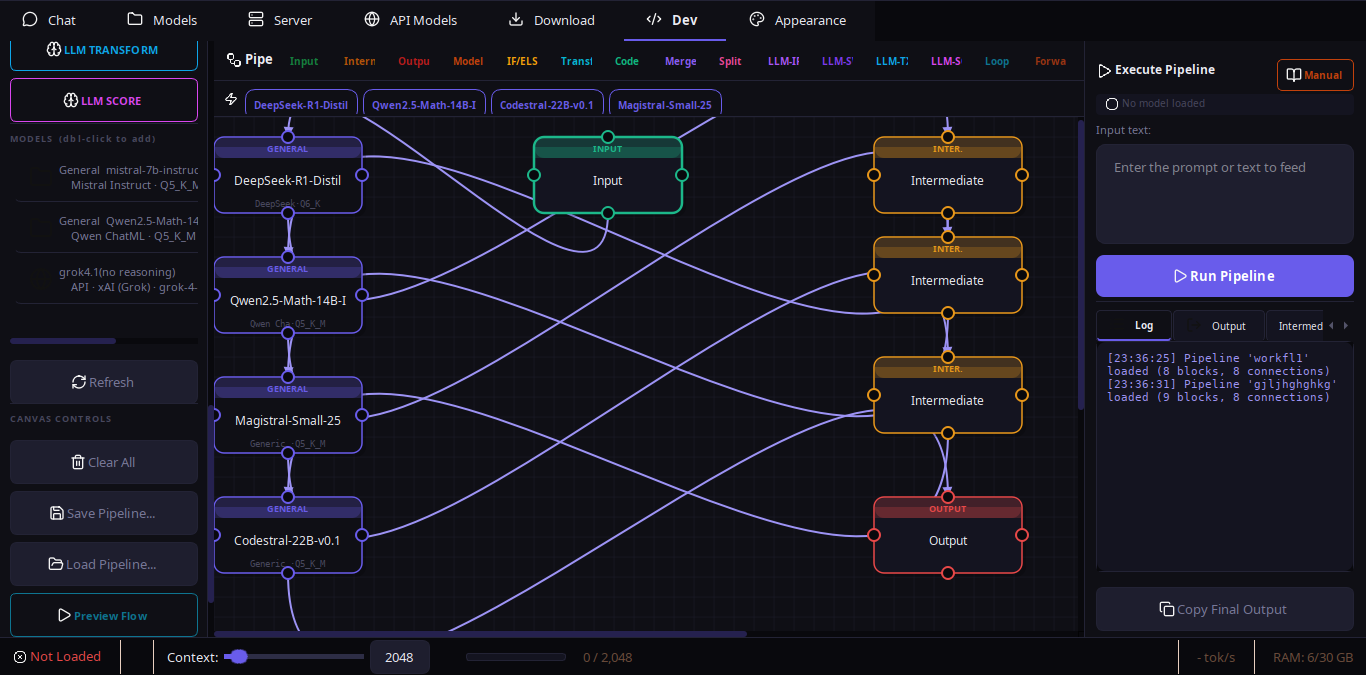
Visual Pipeline Builder
Place blocks, draw connections, preview flow, run the graph, and save it as JSON. Use AI Builder when you want a loaded model to draft or revise the pipeline for you.
Editor
The builder combines a block sidebar, auto-growing canvas, and a right sidebar with Execution and AI Builder tabs. Sidebars resize, scale text, and retract into reopen rails instead of disappearing.
Add blocks, drag models, connect port dots, pan blank canvas, preview flow, and save/load JSON.
Packaged examples like quick answer, triage router, quality gate, draft review, and research synthesis.
IDs normalize on load/generation, far blocks expand the canvas, duplicate edges are ignored, and direct model-to-model links are blocked.
AI Builder
The AI Builder tab sends a compact schema guide to the active model, checks context before the call, extracts JSON, retries once if needed, fills active-model placeholders, validates, saves, and lets you test.
Any active local, Ollama, HF, or API model can be used.
Name the output JSON and ask for the workflow you need.
Saved pipelines load back onto the canvas through normal persistence.
Blocks
Use deterministic blocks where possible and LLM logic where language judgment is useful.
Input, Output, Model, Intermediate with live streaming output tabs.
Reference, Knowledge, and PDF Summary blocks inject reusable material.
IF/ELSE, SWITCH, FILTER, TRANSFORM, MERGE, SPLIT, and safe Custom Code.
LLM-IF, LLM-SWITCH, LLM-FILTER, LLM-TRANSFORM, and LLM-SCORE.
Execution
Manual, generated, loaded, and CLI-run pipelines share validation, graph normalization, deterministic helpers, and centralized LLM error handling.
Required blocks, valid endpoints, model refs, context/PDF metadata, LLM instructions, and custom code checks.
Optional C helpers accelerate ID normalization, loop checks, route selection, transforms, merges, and validation records.
Context-window and engine errors surface as user-facing dialog text, not just logs.